
Record your screen and your face.
Post it the same day.
BlitzRecorder is a free Mac app. It frames your take for YouTube and Shorts and cuts the pauses for you.
No account · No watermark · macOS 15 Sequoia or later · Apple silicon and Intel
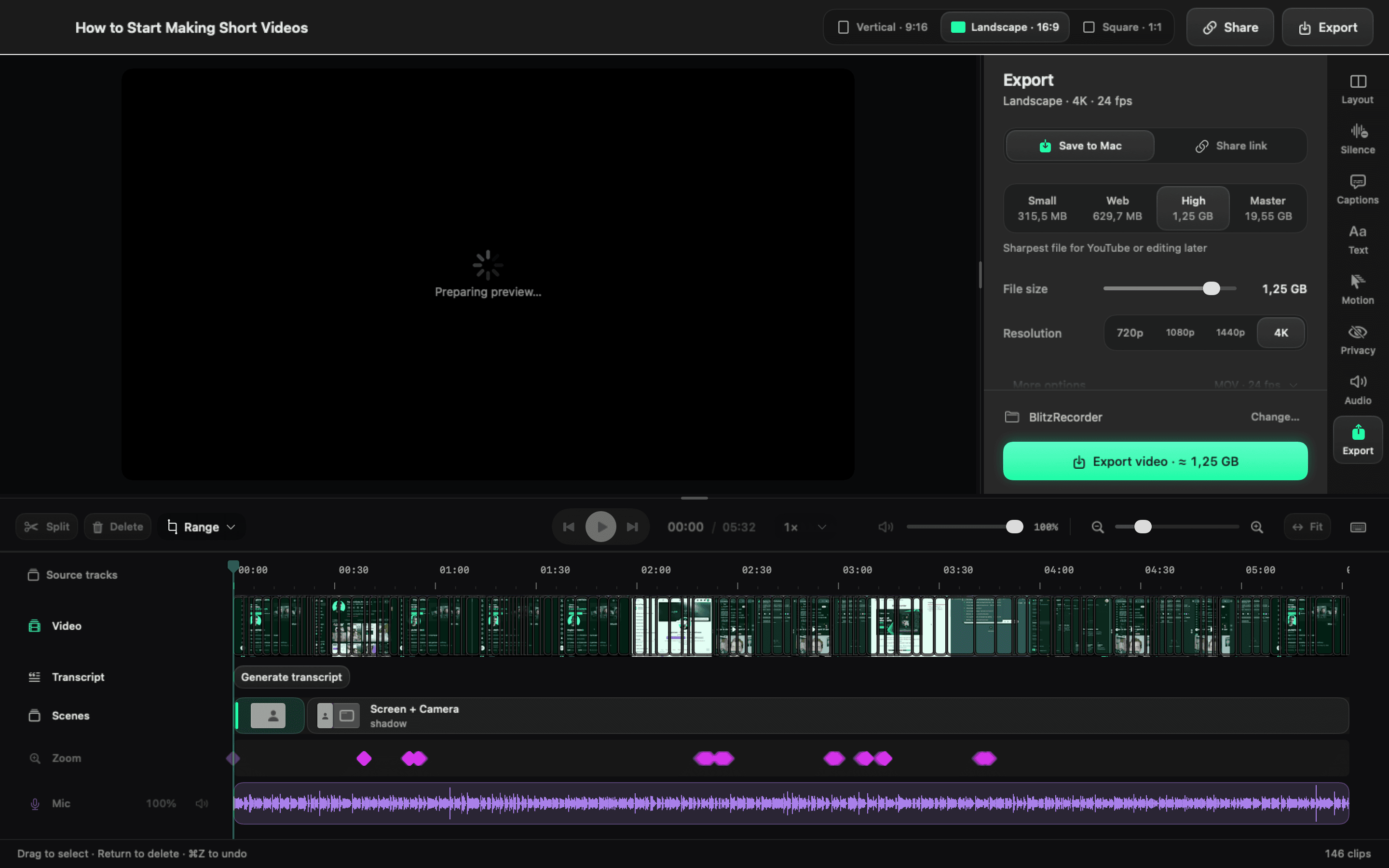
From one take to a finished video.
Three steps, all in one app on your Mac.
- 1
Download and open.
Free, with no account. Allow screen, camera and mic access once.
- 2
Record one take.
Your screen and your face together, already framed for YouTube or Shorts.
- 3
Cut and post.
Cut the pauses in one click, then export in 4K or share a link.
Shorts that look pro, made in one app.
A tutorial, a talking head and a product demo by Virgile, who builds BlitzRecorder. Exported straight out of the app.
Finish the edit in one click.
These are the first two minutes of a real take. BlitzRecorder found every pause. Press the button to cut them all.
14 pauses found2:00
Make every video for free.
The whole app is free and open source. Pay only if you want us to host your share links.
Free
The app, with every feature
- Screen and camera in one take
- Vertical, landscape and square from one recording
- Pauses cut in one click
- 4K export with no watermark
- Updates itself
No account · No watermark · macOS 15 Sequoia or later · Apple silicon and Intel
€9
A month for hosting, if you want it
- Share a link instead of sending a file
- 50 GB of storage and 5 hours of uploads a month
- Cancel from the app
Look sharp with the iPhone you already own.
Full-quality video from your iPhone, framed from your Mac. The iPhone app is in testing now.
Questions, answered.
What people ask before they download.
- Is it really free? What's the catch?
- Recording, editing and 4K export are free, with no watermark and no account. The only paid part is optional hosting for share links.
- Do I need to know how to edit?
- No. Pick a layout before you record, then cut your pauses in one click. The timeline is there when you want more.
- Where do my recordings go?
- To a folder on your Mac. Nothing uploads unless you share a link.
- Can I use my videos for work?
- Yes. Your videos are yours. The open-source license covers the app's code, not what you make with it.
- Will it still be around next year?
- BlitzRecorder has shipped more than 40 updates since June 2026, all in public on GitHub. The code stays open whatever happens.
- What does sharing a link cost?
- Nothing through your own Cloudflare account. Our hosting is €9 a month for 50 GB.
Your next video, ready to post today.
No account · No watermark · macOS 15 Sequoia or later · Apple silicon and Intel